
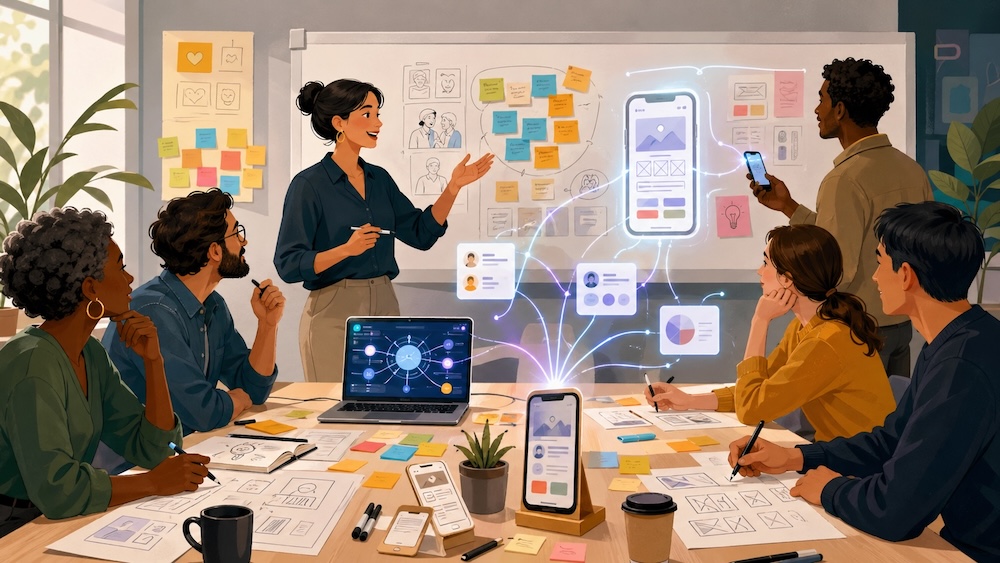
Artificial intelligence can make Design Thinking faster, deeper, and more useful. It can help a team synthesize messy research, turn observations into themes, generate “How might we” questions, expand idea options, build prototype drafts, and prepare reports. But there is one important condition:
AI should support human-centered work, not replace it.
The best Design Thinking with AI still starts with people. You observe them. You interview them. You listen closely. You notice what they say, what they do, what they avoid, where they struggle, and what they hope for. Then AI can help you make sense of what you are learning, organize it, and move from insight to action more quickly.
That is the real opportunity of Design Thinking AI. It is not just “prompting ChatGPT for ideas.” It is using AI as a thinking partner inside a structured innovation process while the facilitator, leader, or project team stays close to the humans they are designing with and for.
At InnovationTraining.org, we often describe Design Thinking as a human-centered creative problem-solving process. You can learn more about the steps of Design Thinking and explore our broader Design Thinking workshop resources. This guide supplements our design thinking AI training and AI innovation workshops. It focuses on how AI can fit into that process in practical ways.
What Is Design Thinking AI?
Design Thinking AI is the use of artificial intelligence tools to support the major activities of Design Thinking: empathy, synthesis, problem definition, ideation, prototyping, testing, and iteration.
It can help with tasks like:
- Summarizing interview notes
- Theming survey or workshop responses
- Identifying patterns in participant reflections
- Turning needs into insight statements
- Drafting “How might we” questions
- Generating idea options
- Creating prototype copy, app screens, workflows, role-play scripts, or test plans
- Comparing concepts against user needs
- Producing summaries and reports for stakeholders
The key is that AI works best when it has real human input. The richer the observations, quotes, stories, notes, and reflections you bring in, the more useful the AI output can become.
AI should not invent empathy. It should help you work with the empathy you gained.
A Live Example: AI in a Design Thinking Workshop
Recently at the CultureCon AI Summit, I used AI live with a group during a Design Thinking-style experience.
The group was not sitting passively while AI generated answers. They were reflecting. I was observing them. I was interviewing them. Participants were interviewing each other. They shared insights back with the room. They worked to define their needs and turn those needs into insights and questions.
Then they submitted their thinking live through Slido.
That gave us a powerful set of real-time human data: reflections, needs, themes, questions, observations, and ideas from the room. From there, AI became a synthesis and acceleration partner.
I could use AI to:
- Cluster and theme the group’s responses
- Create a quick report from the live inputs
- Identify patterns across participant needs
- Generate recommendations
- Help create “How might we” questions
- Suggest ideas based on the group’s own data
- Support prototype development
- Turn insights into next-step actions
The most important part was that I was still in the room, with the people.
I was not removed from the process. I was gaining empathy, watching the group, hearing tone and emotion, asking follow-up questions, noticing energy, and developing my own ideas. AI helped me process more input faster, but the human connection and facilitation were still central.
That is the mindset leaders need for applying AI in Design Thinking: be with the people, then use AI to help make meaning and move forward.
Where AI Fits in the Design Thinking Process
A simple way to apply AI is to map it to the classic Design Thinking stages: empathize, define, ideate, prototype, and test.
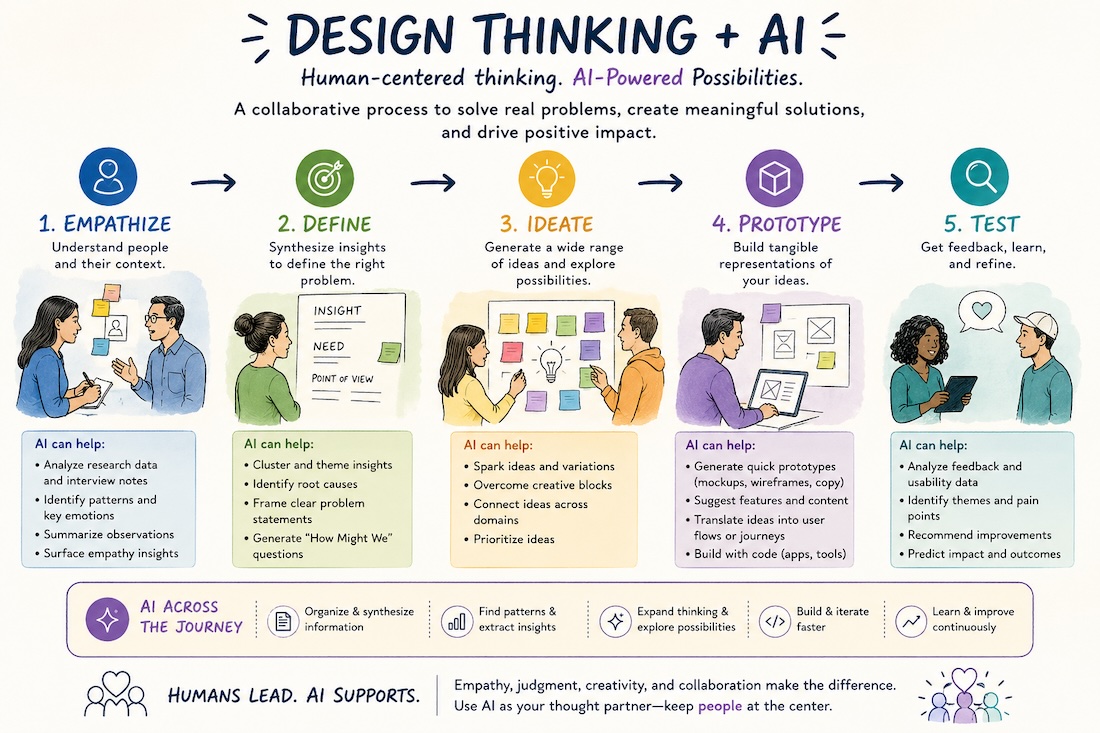
1. Empathize: Use AI to Prepare and Organize, Not Replace Listening
The empathy stage begins with real people. You interview, observe, listen, shadow, survey, or invite people to share stories. AI can help before and after those interactions, but it should not become a substitute for them.
AI can help you prepare:
- Draft interview questions
- Create observation guides
- Build empathy map templates
- Suggest stakeholder groups to include
- Create reflection prompts for participants
- Prepare survey questions or Slido prompts
AI can also help you organize what you learn:
- Summarize interview transcripts
- Extract user quotes
- Identify emotional language
- Cluster pain points
- Compare needs across stakeholder groups
- Find contradictions or tensions in the data
A useful prompt:
“Review these interview notes and identify recurring needs, frustrations, motivations, and moments of uncertainty. Keep the findings grounded in the actual words of participants. Include direct quotes where useful. Do not add assumptions that are not supported by the notes.”
The facilitator’s job is to keep checking the output against reality. Ask: Does this match what we actually heard? What feels missing? Which theme needs more evidence? What might AI be smoothing over?
For leaders building this capability across teams, our Design Thinking training workshops can help participants practice empathy and synthesis in a structured way. We cover this in depth in our guide to AI in the empathize stage.
2. Define: Turn Messy Input Into Clearer Needs and Questions
The define stage is where many projects get stuck. Teams gather a lot of input but struggle to turn it into a useful problem frame.
AI can help convert raw data into clearer statements:
- “Users need…”
- “We observed…”
- “The tension seems to be…”
- “A key insight is…”
- “A possible design challenge is…”
- “How might we…?”
For example, after gathering live reflections from a group, you could ask AI:
“Based on these participant responses, identify the top five need themes. For each theme, write one insight statement, one user need statement, and three possible ‘How might we’ questions.”
This is especially useful during live workshops because it helps the group see its own thinking reflected back quickly. Instead of waiting days for a report, participants can work with emerging themes in the moment.
But the group should still validate the themes. A good facilitator might say:
“Here is what the AI helped synthesize from your responses. What feels accurate? What feels incomplete? Which theme has the most energy for you? What wording would you change?”
This keeps ownership with the people in the room.
For deeper work on using AI with complex questions, check out thinking well with AI, which connects AI use to problem framing and meaningful work.
3. Ideate: Use AI to Expand Possibility, Then Let People Improve the Ideas
AI is useful for divergent thinking because it can generate many options quickly. It can suggest ideas from different perspectives, combine concepts, create variations, and help a group move beyond the first obvious answers.
AI can help with ideation by generating:
- 50 quick solution ideas
- Ideas by stakeholder group
- Low-cost ideas
- bold ideas
- Service improvements
- Communication concepts
- Digital product features
- Workshop activities
- Behavior-change nudges
- Pilot experiments
A useful prompt:
“Generate 30 ideas for this ‘How might we’ question. Organize them into low-effort, medium-effort, and bold experiment categories. Make sure each idea connects back to the user needs and insights below.”
AI can also remix ideas:
“Take these five ideas from the group and create 10 hybrid concepts that combine the strongest parts of each.”
The risk is that teams treat AI ideas as finished ideas. They are not. AI-generated ideas are raw material. The group still needs to select, combine, challenge, humanize, and improve them.
A strong facilitation move is to have AI generate a broad idea set, then ask participants:
- Which idea has energy?
- Which idea is closest to the real need?
- Which idea would users actually try?
- Which idea is easiest to test this week?
- Which idea could become more human, useful, or memorable?
AI widens the idea field. People make meaning and choices. By me being in the room with people, I overhear things from the group that cause a spark in me that leads to a new idea I can have AI help prototype. This is what happened for me at the CultureCon AI Summit workshop. It began with empathy, listening, and observing.
4. Prototype: Move From Concept to Something People Can React To
Prototyping is where AI becomes especially powerful. A team can now create tangible drafts in minutes instead of days.
Depending on the challenge, AI can help create:
- Landing page copy
- Email drafts
- Service scripts
- Role-play scenarios
- Customer journey mockups
- App screen descriptions
- Clickable prototype outlines
- Training activities
- Process maps
- Chatbot flows
- Policy drafts
- Storyboards
- Pitch decks
- Test instructions
For technical prototypes, AI coding tools can help turn a concept into a rough working demo. In a Design Thinking session, even a simple app-like prototype, form, chatbot, calculator, dashboard, or workflow can make an idea easier to understand and test.
The goal is not to build the final product. The goal is to create something people can react to.
A useful prompt:
“Turn this concept into a rough prototype description. Include the user goal, key screens or steps, sample copy, and what we should test with users first.”
Another:
“Create a simple role-play script that lets us test this service experience with a participant in five minutes.”
This is where Design Thinking AI can help teams develop a stronger bias toward action. Instead of discussing an idea endlessly, they can make it visible, testable, and improvable.
For related innovation-session support, check out our innovation workshops and innovation facilitation training. Here’s a video I created demonstrating a prototype that was created from the approach we are talking about.
5. Test: Use AI to Learn Faster From Feedback
Testing is not just asking, “Do you like it?” It is observing how people respond to the prototype, what confuses them, what they value, and what they would actually use.
AI can help prepare test plans:
- Interview questions
- Usability tasks
- Feedback forms
- Observation checklists
- Assumption tests
- Pilot evaluation plans
After testing, AI can help synthesize feedback:
- What worked
- What confused people
- What users ignored
- What language they used
- What objections came up
- Which assumptions were supported
- Which assumptions need more testing
A useful prompt:
“Analyze this prototype feedback. Identify the strongest positive signals, the biggest points of confusion, the unmet needs, and the recommended next iteration. Separate evidence from interpretation.”
That last sentence matters: separate evidence from interpretation.
AI can make synthesis easier, but teams still need to practice judgment. They need to ask whether they have enough evidence, whether the right people were included, and whether they are hearing what users actually said instead of what the team hoped they would say.
A Practical Workflow for Design Thinking With AI
Here is a simple way to run an AI-supported Design Thinking project.
Before the session
Use AI to help create:
- A workshop agenda
- Stakeholder interview questions
- Slido or survey prompts
- Empathy map templates
- Synthesis categories
- Ideation prompts
- Prototype formats
- A testing plan
During the session
Use AI to help:
- Summarize live participant input
- Cluster responses into themes
- Draft insight statements
- Generate “How might we” questions
- Create idea starters
- Turn selected ideas into prototype drafts
- Prepare a quick report or readout
After the session
Use AI to help:
- Produce a participant summary
- Create a leadership report
- Identify next experiments
- Draft communications
- Build a prototype backlog
- Compare outputs against original needs
- Plan the next workshop or sprint
This approach works especially well when combined with strong facilitation. AI can process inputs quickly, but a facilitator designs the experience, reads the room, asks better questions, and keeps the work grounded in people.
What AI Should Not Do in Design Thinking
AI is powerful, but it has limits. Teams should be careful not to let AI:
- Replace direct contact with users
- Invent needs without evidence
- Over-summarize emotional nuance
- Flatten minority perspectives
- Treat the loudest pattern as the most important one
- Generate generic ideas disconnected from real context
- Create a false sense of certainty
- Make decisions the team has not validated
Good Design Thinking is not just fast. It is grounded, participatory, creative, and iterative.
AI can help speed up the work, but speed is not the only goal. The goal is better learning, better alignment, better ideas, and better solutions for real people.
Best Practices for Applying AI in Design Thinking
1. Start with real human input
Do not begin by asking AI what users need. Begin by listening to users, customers, employees, participants, or stakeholders. Then ask AI to help synthesize what you heard.
2. Keep raw data connected to the synthesis
When AI identifies a theme, ask it to show the quotes or responses that support the theme. This keeps the work evidence-based.
3. Use AI for divergence and convergence
AI can help generate many options. It can also help cluster, prioritize, and compare. Use it for both zooming out and zooming in.
4. Make the group part of the AI review process
Share AI-generated themes with participants. Ask what is accurate, what is missing, and what needs better wording. This builds trust and improves quality.
5. Prototype earlier
Use AI to make rough versions faster. A draft is often enough to help people react, improve, and clarify what they really need.
6. Protect sensitive information
Do not paste confidential, personal, or proprietary data into AI tools without the right permissions, settings, and safeguards. Create clear norms for what can and cannot be used.
7. Build facilitator skill, not just prompt skill
The best AI-supported Design Thinking sessions still need strong facilitation. The leader needs to guide participation, manage energy, create psychological safety, and help the group move from ambiguity to action.
That is why AI for Design Thinking connects naturally to innovation facilitation training and broader Design Thinking training workshops.
Prompt Examples for Design Thinking AI
Here are a few practical prompts you can adapt.
Empathy synthesis prompt
“Analyze these interview notes. Identify user needs, frustrations, motivations, emotions, and surprises. Include supporting quotes. Do not add assumptions beyond the notes.”
Theme clustering prompt
“Cluster these workshop responses into 5 to 7 themes. Give each theme a short title, a plain-language description, and examples from the responses.”
Insight prompt
“Turn these themes into insight statements. Each insight should explain what people need, why it matters, and what opportunity it suggests.”
How might we prompt
“Generate 15 ‘How might we’ questions from these insights. Make them specific enough to guide ideation but open enough to invite multiple solutions.”
Ideation prompt
“Generate 40 ideas for this ‘How might we’ question. Include a mix of quick wins, service improvements, communication ideas, digital tools, and bold experiments.”
Prototype prompt
“Turn this selected idea into three prototype options: a low-fidelity paper prototype, a role-play prototype, and a simple digital prototype. Include what we should test with users.”
Testing prompt
“Create a 30-minute user testing plan for this prototype. Include tasks, questions, observation notes, and success signals.”
Report prompt
“Create a concise project summary from this Design Thinking session. Include participant needs, themes, insights, selected ideas, prototype concepts, and recommended next steps.”
The Future of Design Thinking Is Human Plus AI
The future of Design Thinking is not AI replacing human creativity. It is people using AI to think, learn, and build faster while staying connected to the real humans at the center of the challenge.
In the best Design Thinking AI projects, the leader is not behind the screen. The leader is in the room, observing, interviewing, listening, synthesizing, and helping people participate. AI becomes a partner that helps the group see patterns, generate options, and move toward prototypes more quickly.
That combination is powerful:
- Human empathy
- Group participation
- Facilitated sensemaking
- AI-supported synthesis
- Faster prototyping
- Better testing
- Clearer next steps
Organizations do not just need more AI tools. They need people who can use AI inside meaningful human-centered work.
If your team wants to build this capability, explore our Design Thinking training workshops, Design Thinking workshop resources, and innovation facilitation training. You can also use the Design Thinking self-assessment to reflect on your current strengths and opportunities. Our AI Hackathon for AI Adoption is a great experience to put design thinking with AI into action.
The opportunity is not just to use AI. It is to use AI to become better at understanding people, defining meaningful challenges, generating better ideas, and testing solutions that matter.