For years the digital whiteboard did one job: it gave a group a shared wall for sticky notes, sketches and frameworks. People did the thinking, and the board held it.
That has changed. The board now does some of the work. AI can draft the first version of a board from a conversation, group a hundred sticky notes into themes, summarize a session into an action plan, and carry the results into a document or a deck. AI assistants such as Claude, ChatGPT and Copilot can also reach into Miro, Lucid, Mural and FigJam and read or build boards directly.
This guide maps the options for facilitators, trainers, innovation leads and teams who run workshops. It covers AI-native boards, the AI built into the whiteboard tools you already use, the connector approach (MCP) that links AI assistants to boards, and how to use all of this without losing the human thinking that makes a session worth holding.
The three ways AI shows up on a whiteboard
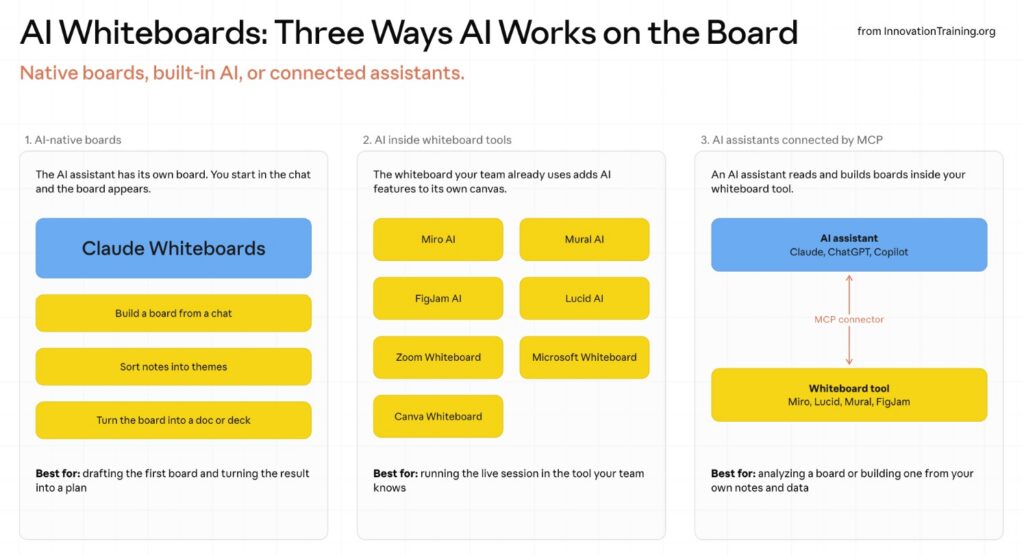
It helps to sort the options into three groups, because they solve different problems.
- AI-native boards. The AI assistant has its own whiteboard. You start in the assistant and the board appears as part of the conversation. Claude Whiteboards is the main example.
- AI inside whiteboard tools. Miro, Mural, FigJam, Lucidspark, Microsoft Whiteboard, Zoom Whiteboard and Canva have each added AI features to their own canvas. You stay in the tool your team already uses.
- AI assistants connected to boards (MCP). The Model Context Protocol lets an AI assistant read from and write to a whiteboard tool. You ask Claude or another assistant to pull a board, analyze it or build a new one, and the work lands in Miro, Lucid, Mural or FigJam.
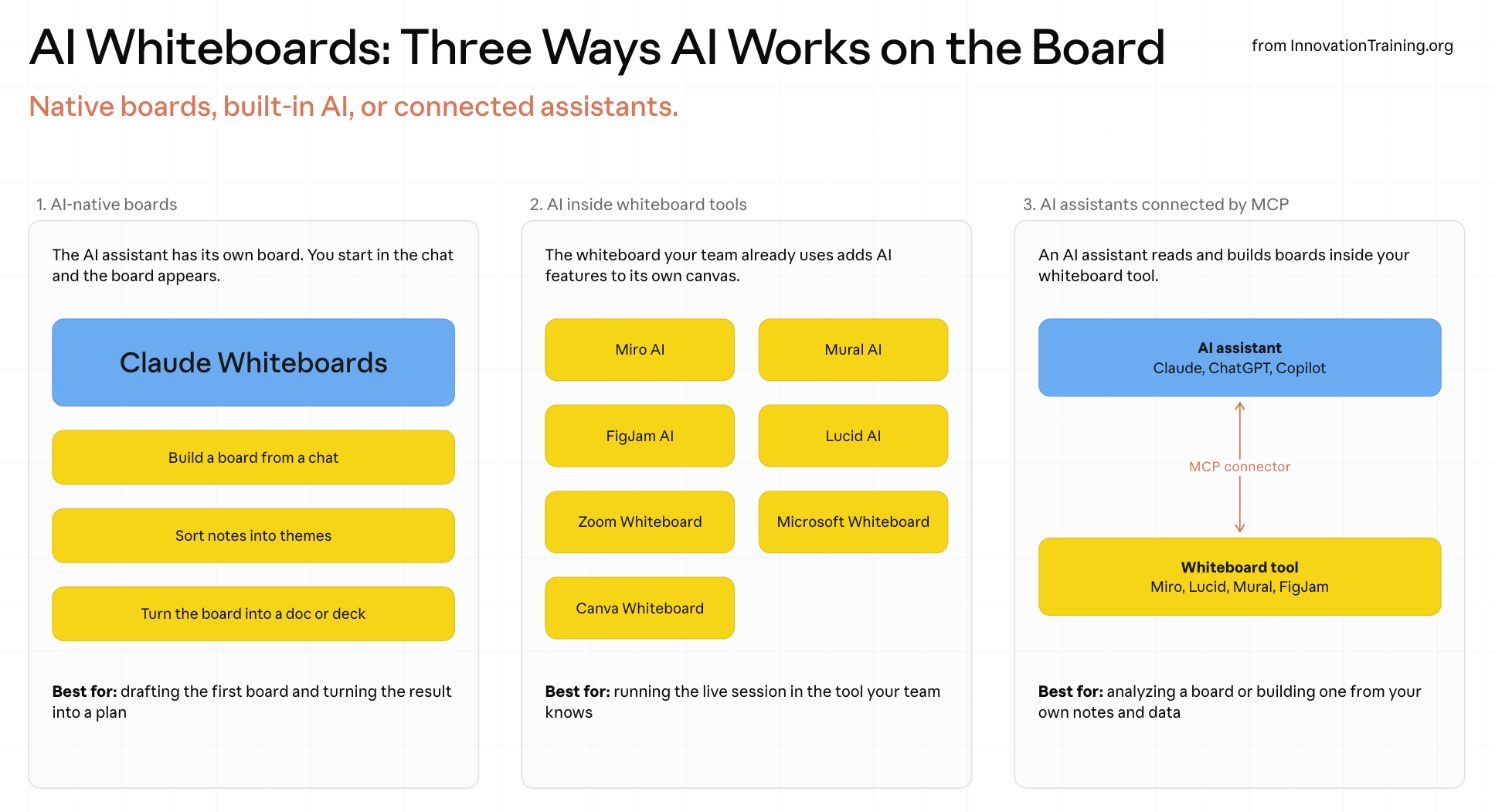
Most teams will end up using more than one. A workshop might start with an AI-generated draft board, run in Miro or Mural with the group, and finish with an assistant turning the board into a report.
Claude Whiteboards
Claude Whiteboards is a shared board inside Claude where a team lays out ideas together and works with Claude on the same canvas.
What it can do
- Build a board from a conversation. You can talk through a messy plan and Claude turns it into a board with a timeline, owners and dates.
- Organize the group’s input. In a retrospective, everyone adds notes and Claude groups them by theme and drafts action items for each person.
- Answer questions about part of the board. You can draw a box around any section and ask Claude about it.
- Turn the board into something else. When the session ends, Claude can convert the board into a document or a slide deck, or carry it into tools such as Lucid or Miro so the team can keep working there.
- Work in real time. Boards are shared, so the team and Claude can work on them together.
Availability. Claude Whiteboards is available on paid Claude plans on web, desktop and mobile. On business plans an admin may need to turn it on. Plan details can change, so check Anthropic’s site for the current list.
Where it fits. Claude Whiteboards is strongest at the moments around a session: drafting the first board from a planning conversation, sorting what a group produced, and turning the result into a plan or a deck. For a large, template-heavy workshop with a big group, many teams will still run the live session in a dedicated whiteboard tool and use Claude before and after. For a hands-on look with real example boards, see What Is Claude Whiteboards? A Hands-On Look.
Miro AI
Miro has moved furthest toward an “AI workspace.” Its feature names change from time to time, but these are the main pieces.
- Sidekicks are AI agents that work alongside the team on the board. Miro says they can break an ambiguous problem into steps and ask clarifying questions. Miro keeps adding to what they can do on their own.
- Flows are repeatable AI workflows. From a single prompt, a Flow can generate frames, tables, diagrams and other content on the canvas, with approval steps so a person stays in control. Connectors let Flows pull from other tools, such as meeting transcripts or project trackers.
- Intelligent Canvas is Miro’s umbrella term for this AI-aware canvas. Our guide to Miro’s Intelligent Canvas walks through it, and Miro AI: what you need to know covers the core features such as clustering sticky notes and generating mind maps.
- Miro MCP server. It lets Claude, Claude Code, ChatGPT, Cursor, Copilot and other MCP-compatible tools read and write Miro boards. Miro is also a native connector inside Claude, ChatGPT and Microsoft Copilot.
For a practical example, see how to create a mind map with Miro AI.
Mural AI
Mural has long focused on facilitated sessions, and its AI follows that focus.
- Mural AI helps generate ideas, cluster and summarize sticky notes, and draft content from prompts. It is available on Mural’s paid team and business plans, and a company admin may need to turn it on.
- Mural MCP server. Mural also offers an MCP server that lets AI assistants such as Claude, ChatGPT and Gemini read and write Mural canvases.
Our overview of Mural AI goes deeper on the in-tool features, and what is Mural covers the basics for design thinking work.
FigJam AI
FigJam, Figma’s whiteboard, added AI that can generate boards, diagrams and meeting templates from a prompt, and sort and summarize sticky notes. See FigJam AI from Figma for the details.
The bigger story for FigJam is the Figma MCP server, which works across Figma Design, FigJam, Slides and Make. With the Figma app in Claude, teams can create editable FigJam diagrams from a prompt. Figma also describes using its MCP server to generate FigJam boards from live data and to give coding agents the planning context from a FigJam board. FigJam is a natural choice when the workshop feeds a product or design team that already lives in Figma.
Lucid AI (Lucidspark and Lucidchart)
Lucid splits its tools between Lucidspark (the whiteboard) and Lucidchart (diagrams), and its AI spans both. See Lucid’s collaborative AI and Lucidchart vs. Lucidspark if you are choosing between them.
The Lucid MCP server works with Claude on the web, Claude desktop and Claude Code, and Lucid offers one-click connectors for Claude and ChatGPT. Its tools cover searching documents, pulling content, creating diagrams, sharing and exporting images. On Team and Enterprise accounts, a Lucid admin has to enable MCP access first. Lucid is also one of the tools Claude Whiteboards can send a board to.
AI whiteboards in Microsoft, Zoom and Canva
Many organizations already pay for one of these, which makes them the easiest place to start.
- Copilot in Microsoft Whiteboard. Copilot can suggest ideas as sticky notes, categorize similar notes into groups, and summarize a board into a Loop component the team can edit and share. It requires an eligible Microsoft 365 or Copilot license.
- Zoom Whiteboard with AI Companion. Zoom’s AI Companion can generate sticky notes, tables, text and mind maps from a prompt and turn meeting content into visual frameworks. It needs an eligible paid Zoom Workplace plan. See our Zoom whiteboard templates for design thinking.
- Canva Whiteboards. Canva can sort sticky notes by color, author, reactions or topic, and summarize a whole board, including notes and diagrams, into a document. See the Canva online whiteboard guide and Canva whiteboard templates.
What MCP means for whiteboards
MCP (Model Context Protocol) is an open standard that lets an AI assistant connect to other software. For whiteboards, it means you no longer have to copy and paste between your AI chat and your board.
With an MCP connection, you can ask an assistant to:
- Read last week’s workshop board and summarize the top themes and open questions.
- Build a new board for an upcoming session, with frames for each activity.
- Turn a research document or interview notes into an affinity map or journey map on the board.
- Compare two boards, such as a “before” and “after” strategy session.
- Pull a board into a written report or a slide outline for leaders.
Which tools have it:
| Tool | MCP status | Works with |
|---|---|---|
| Miro | Available | Claude, Claude Code, ChatGPT, Copilot, Cursor and others |
| Lucid (Lucidspark, Lucidchart) | Available; an admin may need to enable it | Claude (web, desktop, Code), ChatGPT |
| Figma / FigJam | Available through the Figma MCP server | Claude, Codex and other coding tools |
| Mural | Offered by Mural | Claude, ChatGPT, Gemini |
| tldraw, Excalidraw | Developer and open-source options | Coding agents such as Claude Code and Cursor |
MCP support changes often, so confirm current details in each tool’s help pages. Two practical cautions. First, an MCP connection gives the assistant real access to your boards, so check what it is allowed to change and start with read-only tasks. Second, many organizations require an admin to approve these connections, so involve IT early if you plan to use them in a client or company workshop.
Other options worth knowing
- tldraw is an open-source canvas built for AI agents to read and draw on, popular with developers building their own AI whiteboard tools.
- Excalidraw has a hand-drawn style and community tools that turn text descriptions into editable diagrams.
- Klaxoon, Stormboard and Conceptboard are established whiteboard tools worth comparing if your organization has specific security or hosting needs. Our roundup of virtual whiteboards compares the wider field.
How to choose
- Your team already uses one tool heavily. Start with that tool’s built-in AI. The learning curve is smallest and your templates stay in place.
- You want AI before and after the session. Claude Whiteboards, or an assistant connected through MCP, is the fastest way to draft a board from a planning conversation and turn the results into a plan, report or deck.
- You run large live workshops. Miro and Mural have the deepest facilitation features, such as timers, voting, private mode and large template libraries. Use their AI to cluster and summarize, and keep the live session human-led.
- Your output feeds a product or design team. FigJam and the Figma MCP server keep the workshop close to where the product work happens.
- You need process maps and diagrams. Lucid’s combination of Lucidspark and Lucidchart, plus its MCP server, is strong for turning workshop output into clean diagrams.
Facilitating with AI on the board
AI makes whiteboards faster. It does not decide what a group should think, and a facilitator who hands too much to the AI will get faster sessions with weaker ideas. A few principles help.
Let people generate first. Have the group produce its own ideas, stories or observations before AI adds anything. If AI suggestions appear first, people anchor on them and the range of ideas shrinks.
Use AI for the heavy lifting between thinking moments. Clustering 200 sticky notes, drafting a summary, or building next week’s board are good uses. They free time for the conversation, which is where insight happens.
Make AI’s work visible and open to challenge. When AI groups notes into themes, ask the group whether the themes are right and what is missing. Treat the AI’s output as a draft the group edits.
Keep the choices human. Voting, prioritizing and committing to action should stay with the people who will carry the work forward.
Mind the data. Workshop boards often hold sensitive material such as customer feedback, strategy or people issues. Check which AI features your organization has approved before a client or company session.
For a fuller model, see Facilitating with AI: a model for group facilitators.
Bringing AI whiteboards into your workshops
AI whiteboards are changing how teams prepare, run and follow up on workshops. The tools will keep shifting, but the skill that matters stays the same: designing a session where people think well together and leave with decisions they own.
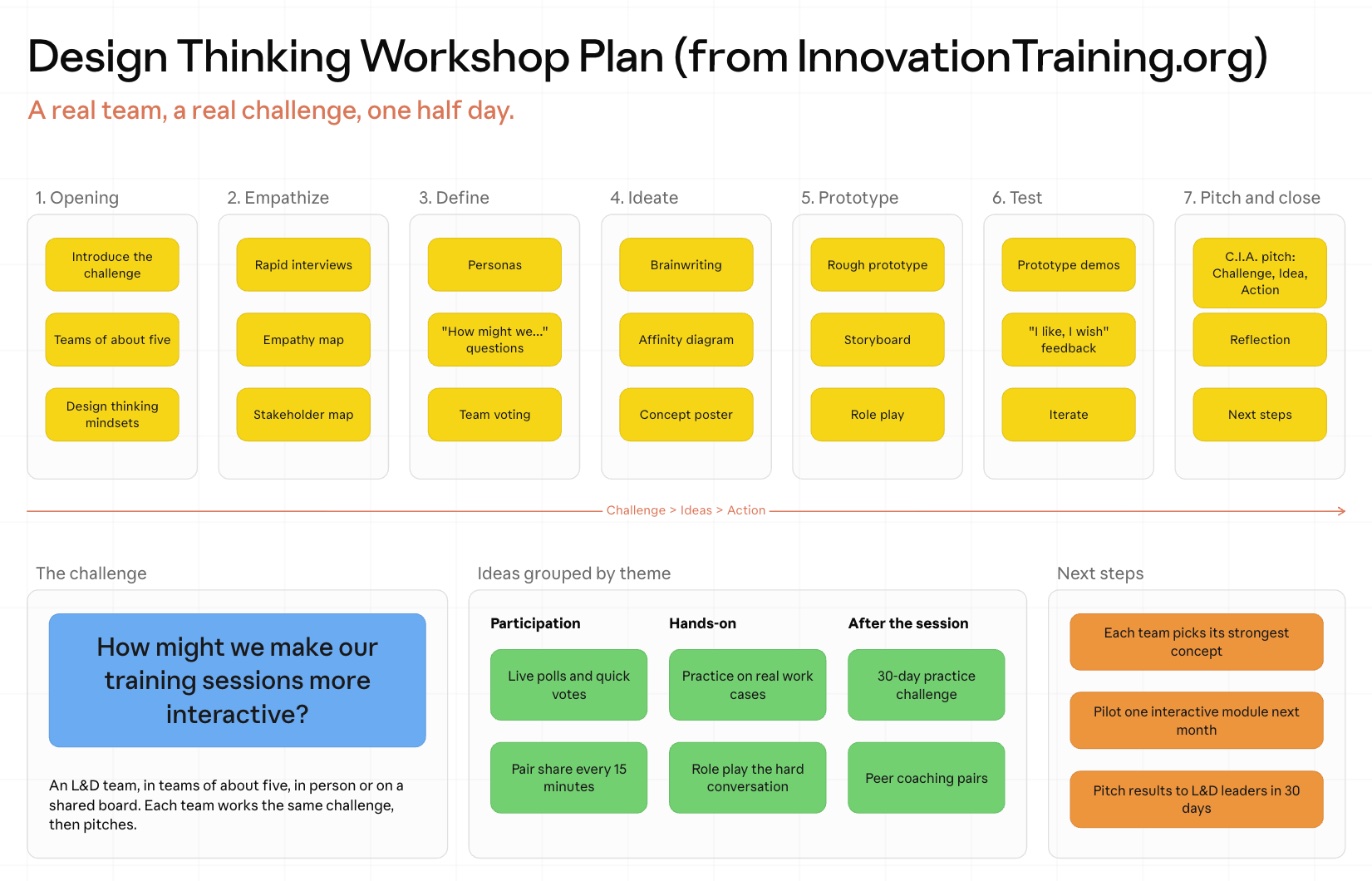
If you want your team or facilitators to build that skill with AI tools, our AI facilitation training for program designers and facilitators covers how to design and lead sessions with AI as a partner. We also run design thinking workshops on Miro, Mural and other boards for teams working on a real challenge. Contact us to talk about a session for your group.